The undo button
Microsoft 365 identity
never gave you.
Cloud Locksmith finds the identity gaps in your tenant, fixes them in one click, and snapshots the previous state first — so any change reverses in under 60 seconds. Every fix logged as evidence for your next audit or insurance renewal.
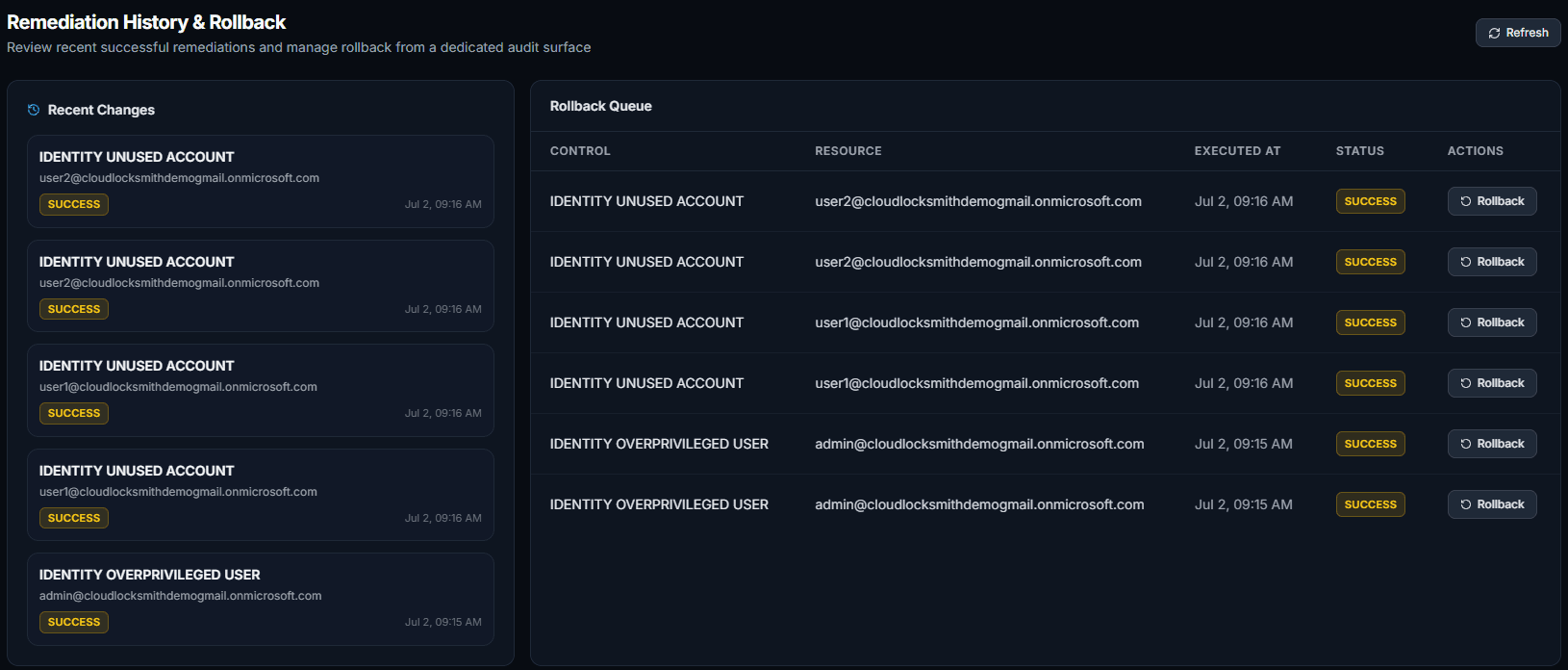
Every applied fix, with its way back — example tenant
Why This Matters
Identity is how most attacks
get into Microsoft 365
Most Microsoft 365 breaches start with a compromised account — not malware or zero-days. Weak MFA, dormant accounts, and excess privileges are the real attack surface.
Microsoft 365 includes Conditional Access, MFA enforcement, and audit logs. Most SMBs have them partially set up at best. The gaps are invisible until they're exploited.
Identity risks drift — new admins, dormant users, changed policies. A one-time setup is never enough. Most teams don't notice drift until an auditor or incident surfaces it.
The Reality
Identity risks are invisible
until they're not.
The biggest threats to your Microsoft 365 tenant aren't sophisticated zero-days. They're the identity gaps already sitting inside it — MFA not enforced, former employees still active, admins with unchecked privileges.
- AUTHUsers without MFAA single unprotected account is all it takes for a full tenant compromise.
- ACCESSFormer employees with active accessOffboarded users still holding live credentials — often for months after leaving.
- PRIVToo many Global AdminsPrivilege creep grows faster than any team can manually audit it.
- OPSNo rollback for config mistakesOne wrong policy change can lock out your team with no fast path back.
How It Works
From sign-in to findings
in under 2 minutes
No agents to install. No configuration required. Connect your tenant and see your real identity risks instantly.
Connect with Microsoft
Sign in using Microsoft's secure OAuth flow. We never see or store your password.
Scan your tenant
Cloud Locksmith reads your tenant in read-only mode — users, auth methods, policies, sign-in logs.
See your risks
MFA gaps, dormant accounts, admin overexposure, and policy gaps ranked by severity.
Fix it — and keep the way back
Approve a remediation and it applies in one click, after a snapshot of the previous state. Reverse it any time in under 60 seconds.
No installation · No agents · No setup · Read-only
What We Check
Six risk categories.
All of them exploited in the wild.
These are the gaps attackers look for first. Most SMBs have at least three of them — and don't know it.
Example Findings
This is what your scan returns
Findings are ranked by severity and include context — not just flags. Here's what a typical SMB tenant scan surfaces.
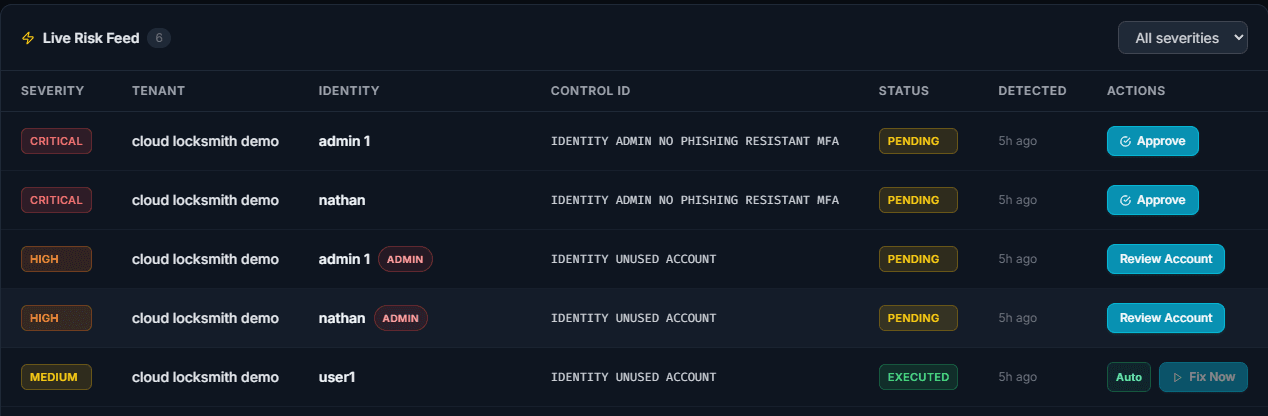
Example tenant — findings and actions shown exactly as the product renders them.
Read-only · No changes made · Under 2 minutes
Safe to Try
The free scan is strictly read-only. See your real risks without any commitment or risk to your tenant.
Why Cloud Locksmith
Plenty of tools can change your tenant.
Ours can change it back.
Applying a fix is the easy half. The hard half is what happens when a policy change locks out your admins at 4pm on a Friday. Cloud Locksmith snapshots the previous state before every remediation, so the way back is one click — not a support ticket. Built for SMBs and MSPs who don't have a second identity team to call.
Every Remediation Creates a Snapshot
Before any change is applied, Cloud Locksmith captures the previous state of your configuration — automatically, with no extra steps required.
One-Click Rollback Restores Previous State
If a fix causes unintended side effects, you can reverse it instantly. No tickets. No scripts. No waiting. Your tenant is back in under 60 seconds.
Safe Automation Without Risk of Lockouts
Built-in guardrails detect and block changes that could lock out admins or break critical access. Automation that protects your environment.
Manual audits. Spreadsheets. No fast way to undo a mistake.
Security checks happen occasionally. Risks build between reviews. When something breaks, remediation turns into ad hoc scripts and tickets — with no fast path back to a known good state.
Continuous. Automated. Auditable.
Risks are surfaced in real time, ranked by severity, and fixed with a single action. Every change is logged, reversible, and protected by built-in guardrails that prevent lockouts.
Evidence, Not Assertions
Your renewal questionnaire,
answered from live data
Cyber insurers and auditors ask the same handful of questions: is MFA enforced, how many admins do you have, how fast do you revoke access. Most teams answer from memory. Cloud Locksmith answers from your tenant — and shows the remediation history behind every answer.
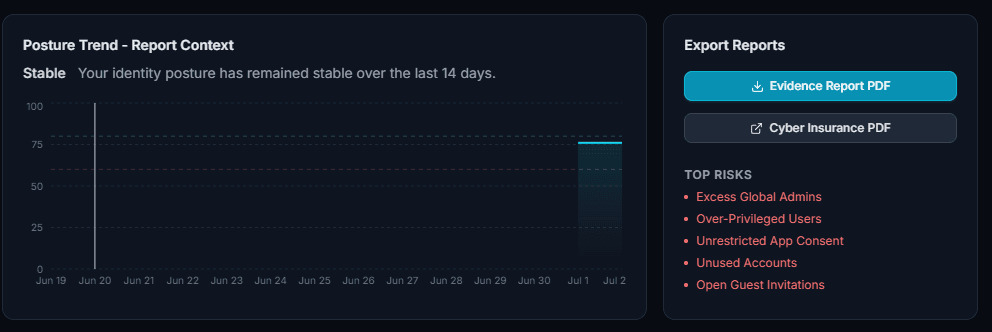
Example tenant — exports generated from live scan data
What's Your Exposure?
What Are Your Identity Risks Costing You?
Enter your numbers to see the real cost of manual incident recovery — before the next mistake happens.
Each misconfiguration — a wrong permission, a missed offboarding, an accidental policy change — takes your admin hours to diagnose and manually reverse. Multiply that across a year and the cost adds up fast.
Annual admin cost of identity incidents
Does not include downtime, breaches, or audit failures.
remediation
with rollback
See your real Microsoft 365 security gaps in 60 seconds
Who It's For
Built for teams that need to
move fast on security
SMBs on Microsoft 365
50–300 employee teams that need stronger identity hygiene without a dedicated security function.
Managed Service Providers
MSPs managing multiple client tenants who need a scalable way to enforce security standards.
Audit-Prep Teams
Organizations preparing for compliance reviews, cyber insurance renewals, or customer scrutiny.
Teams Without a Security Hire
Companies that need immediate coverage for identity risk without building a full security team first.
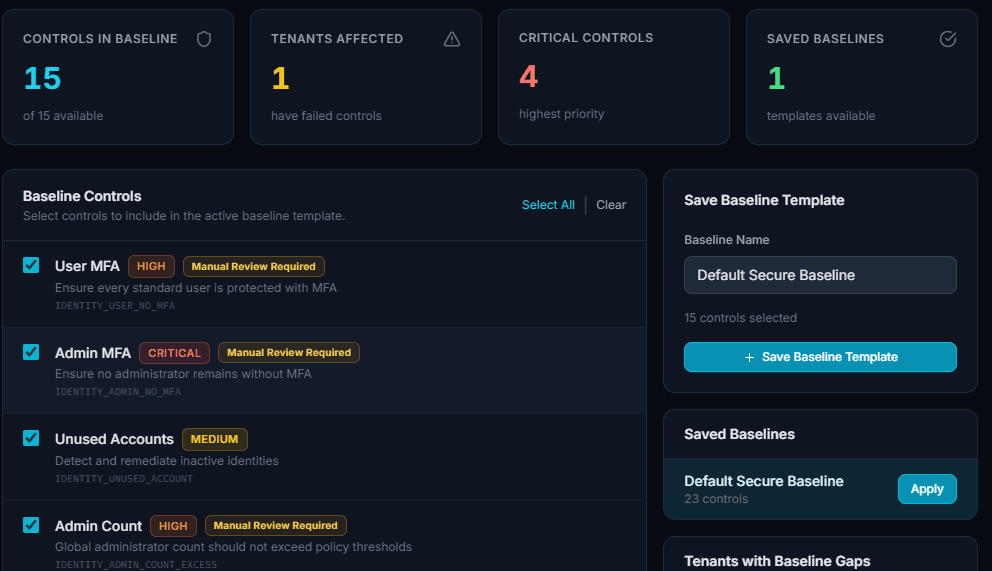
Set a baseline once, apply it across the fleet — high-risk controls stay gated behind manual review
Contact Us
Have questions?
Let's talk.
Have questions or want to learn more about how Cloud Locksmith works for your team?
- ✓Talk through your Microsoft 365 identity risks
- ✓Learn how remediation and rollback work
- ✓See how Cloud Locksmith fits SMB and MSP workflows
- ✓Get started with the right next step for your team
Contact Us
Find out what's exposed
in your Microsoft 365 tenant
Connect your tenant and get a full identity risk report in under 2 minutes. Read-only scan — no changes made, no credentials stored.
Run Free Security ScanWant full remediation access? Sign in with admin access instead